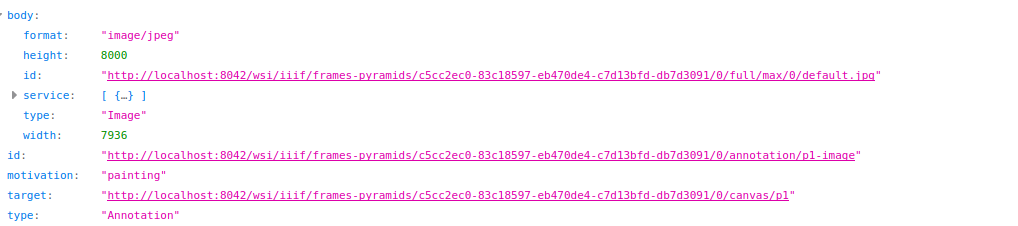
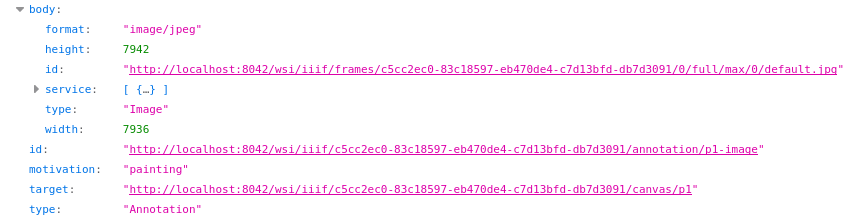
We found some bugs/missing functionnalities on the WholeSlide Imaging plugin.
These are the options in our configs file :
"WholeSlideImaging": {
    "Enable": true,
    "EnableIIIF": true,
    "OrthancPublicURL": "http://localhost:8042/",
    "ServeMirador": true, // Whether to show the "Test IIIF in Mirador" button
    "ServeOpenSeadragon": true, // Whether to show the "Test IIIF in OpenSeadragon" button
    "ForcePowersOfTwoScaleFactors": true // Can be used to disable the compatibility mode
  }
In a series containing multiple high-resolution images (7942x7936) (where we need on-the-fly IIIF).
The manifest.json for each individual instance works perfectly, because it “goes” to the link “wsi/iiif/frames-pyramids/instance_UUID”, and also automatically pad the image cfr next_screen.
In comparison, when we get manifest.json from the series, Orthanc rightfully understand that there are different images (and send multiple items). But it goes to the link “wsi/iiif/frames/instance_UUID/0/full/” (and doesn’t pad). (This is one instance of the series).
Just in case, Orthanc differenciates correctly a series of a pre-tiled image and a series of multiple images to tile on-the-fly.
I would like to add that this problem shows only for series containing dicom files of encapsulated JPEG images.
If these images are stored as PNG, Orthanc doesn’t generate the manifest.json
This is not urgent as the viewers work with the current plugin but the Standard IIIF API shows the following URI :
{scheme}://{server}{/prefix}/{identifier}/{region}/{size}/{rotation}/{quality}.{format}
”wsi/iiif/frames-pyramids/c5cc2ec0-83c18597-eb470de4-c7d13bfd-db7d3091/0/full/max/0/default.jpg” should show the full image at max resolution for example instead of the smallest tile containing the full image.
It could be nice to have the customization for at least “region” and “size”.
This will allow to generate thumbnails for example.
I do not know how to add Dicom Files here but this example has dicomized JPEG files (so it is encapsulated)
I’m unfortunately unable to understand your issue because you haven’t provided enough information for others to reproduce what you consider to be a bug. You should provide a minimal working example, including at least sample DICOM files and the exact calls to the REST API, as explained in the Orthanc Book.
As written in the documentation of the plugin: “The WSI plugin can also generate multi-resolution pyramids on-the-fly from the frames of a DICOM instance”. This implies that this feature is not supported at the series level. It is up to your higher-level application to deal with series containing high-resolution images, by generating IIIF links for the instances inside the series.
A minimal working example is definitely needed here.
From what I see in the source code of the WSI plugin 3.3, wsi/iiif/frames-pyramids/[...]/full/max/[...] is simply not implemented. Again, I would need a minimal working example.
Yes, it would be nice to implement additional support for IIIF, but I already have many other tasks to work on. I would need backing from a research project, a scientific publication, or a funding agency to make this a high-priority task.
Sorry about that here is the config file.
And here are the dicom files. I added a file imported as a png, one imported as a jpeg and a pretiled dicom IIIF image.
For the last one, I forgot to add there is just a bug that appears sometimes on other IIIF viewers (e.g. Mirador and openseadragon), where there is an artefact on the bottom right corner when the image is dezoomed (it goes away when you zoom in). This bug also appeared on on-the-fly images.
But you answered here : it is just not supported at the series level and we will need to check if our images are pretiled or not tiled on-the-fly to send the right api call.
The bugs cited in my first post are only on the series level API (for the PNG and JPG images), so it doesn’t matter in this case