Hi everybody,
I’m having a problem during the export a modified DICOM SEG within the OHIF Viewer with segmentation tools. I thought that when I click this feature, the segmentation would have saved back to my Orthanc server, but OHIF shows a popup with the text “Something went wrong”. To face that I’m forced to download the DICOM SEG and upload to Orthanc. Why? Is that a problem relalted to some configuration in Orthanc or is that an OHIF issue?
Tks a lot,
Lorenzo
1 Like
I too run into this issue. Clicking on the “Show Details” button simply dismisses the alert without providing any information. I don’t see any relevant lines in the logs. Not sure how to troubleshoot this, or whether this is an OHIF or Orthanc problem. Currently using an Orthancteam docker image, but also present with the latest orthanc-python image.
Hi,
it looks like a bug of OHIF Viewer ( [OHI-1445] fix(store-segmentation): storing segmentations was hitting the wrong command resulting in an undefined datasource by IbrahimCSAE · Pull Request #4755 · OHIF/Viewers · GitHub) I hope that soon wiill be released the new version and in Orthanc the updated plugin.
Lorenzo
Hi everybody, I am using the last orthanc image (25.5.1) that should use the OHIF 3.10.1 but I have still this problem during export of Dicom Seg
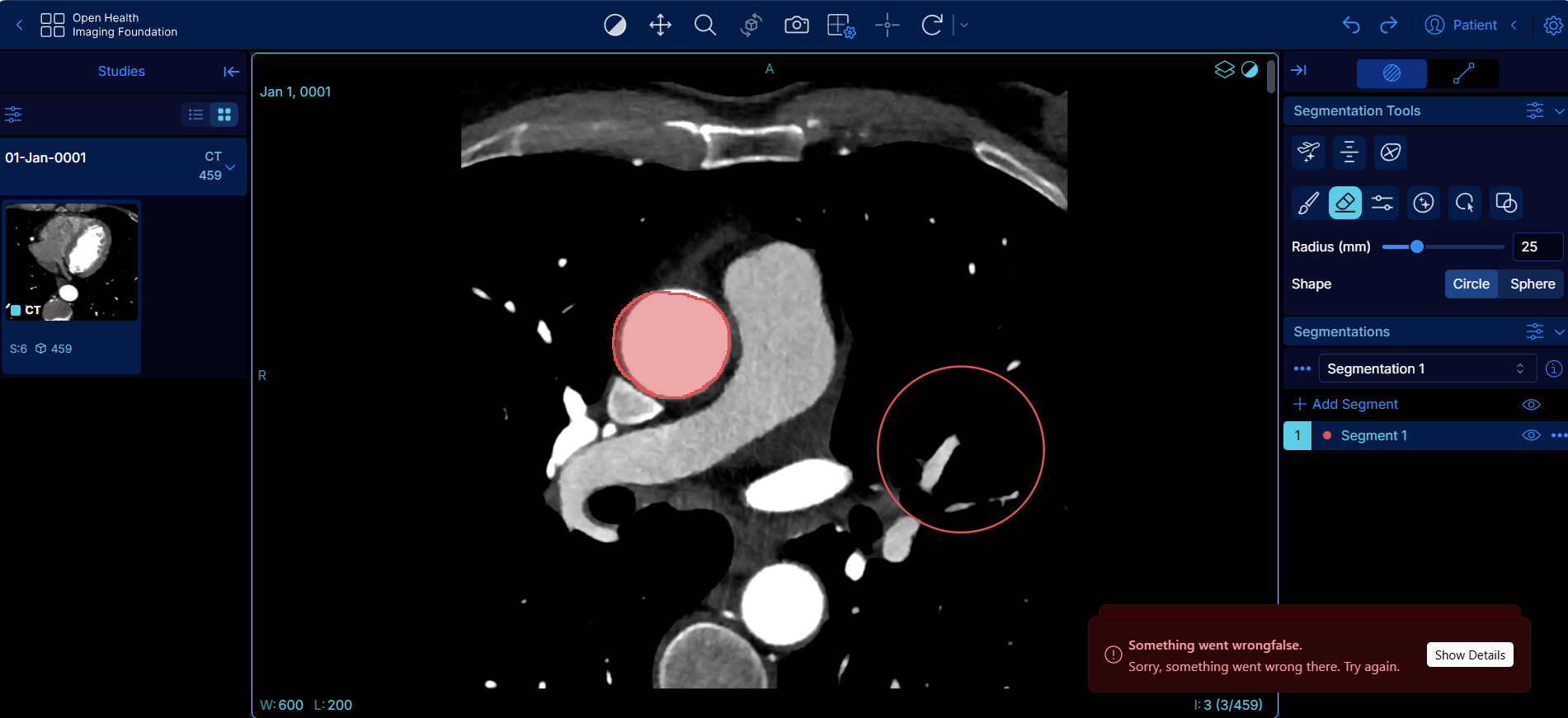
Can anybody give me any suggestion on why it gives this error?
Tks a lot,
Lorenzo
Hello,
Shouldn’t this question be asked to the OHIF team? The Orthanc project does not develop OHIF.
Regards,
Sébastien-
I’ve been experimenting with the segmentation feature and seeing the same issue. I posted some of my findings over at the OHIF git issues page.
One of the “errors” that might be occurring is the failure to properly set the StudyInstanceUID and/or other UID in the DICOM SEG file sent back to Orthanc. Orthanc complains in the logs about missing UID.
For the Orthanc side, I’m wondering if I need to set the ExtraMainDicomTags (stone-viewer example) in the configuration? I don’t quite understand this feature, but perhaps I need to be explicit about what DICOM tags are scraped by dicom-web when sending the image data to the OHIF plugin?
Also, it is unclear to me whether I should be explicitly setting both the dicom-web and wado endpoint URLs to different or the same values. It almost looks like the OHIF plugin is accessing the wado endpoint at /dicom-web rather than /wado and I wonder whether NOT setting the wado endpoint in Orthanc is actually defaulting to /wado instead of what OHIF seems to expect.
John.
Hi,
Indeed, Orthanc requires the 4 DICOM IDs to be present in an instance in order to compute its internal ids.
For the DICOMWeb to work properly, you don’t need to set the ExtraMainDicomTags provided that you are using "StudiesMetadata": "Full" and "SeriesMetadata": "Full" that are recommended values since v 1.15.
I would actually be surprised that OHIF tries to use the WADO-URI endpoint since WADO-URI was marked as “obsolete” quite a long time ago and WADO-URI is only available to retrieve data, not push it.
If OHIF is trying to POST the SEG file to /dicom-web/studies, this looks legit to me. That’s actually a STOW-RS query.
Hope this helps,
Alain
Thanks, Alain.
Two observations:
If I set a break point in the javascript and manually enter the appropriate PatientID and StudyInstanceUID I can get a partial save of the SEG file to appear on the Orthanc as series 99. The SEG file appears to contain all the DICOM meta data, but none of the actual segmentation pixel mask - an incomplete DICOM. But! It does store back to the Orthanc, so there’s that. I think this also confirms that OHIF is using the conventional /dicom-web URL and NOT a /wado URL.
Second observation: I am using the orthancteam/orthanc docker image. I had NOT been setting the DicomWeb variables for StudyMetadata and SeriesMetadata. I did set them explicitly after your suggestion, but nothing really changed. The meta data the OHIF is scraping form the original DICOM still misses key items like PatientID, Study/SeriesInstanceUID and a few more things necessary to upload the SEG back into Orthanc.
Question: Given caching with the DicomWeb, if I only NOW turned on “Full” for Study and Series meta data, do I need to somehow flush the cache in order to force a “full” re-read of the original dicom meta data? Maybe I’m not seeing the PatientID and StudyInstanceUID because I’m getting the smaller cached dataset instead of a fresh full read?
Thanks,
John.
I went back and tested saving a SEG again but with two different patients/studies:
- Recent 3D Enhanced/Multiframe DICOM
a. Same problems: missing meta data coming from the parent DICOM
b. Since this was a different subject, it should not have been an issue of dicom-web grabbing the older cached meta data - Older style (non-Enhanced mode) Siemens DICOM
a. Successfully stores SEG file back to patient/study
b. Successful reload during subsequent launch of OHIF
The problem with the Siemens Enhanced/Multiframe DICOM suggests either an issue with the dicom-web or OHIF preparation of the meta data. I will relay my findings back to the OHIF team.
I may try to find where the meta data enters the OHIF pipeline, but it will probably take me a while to find where in the javascript stack this is happening since I am unfamiliar with the code.
John.
Hi,
can I ask you what version of Orthanc you are using? Are you using the OHIF plugin or in a separate container? Last question, if you open in OHIF Viewer a DICOM series from Orthanc, add a new segmentation and try to export it directly on Orthanc does it work fine for you? Tks,
Lorenzo
Hi,
By default, these configurations are set to Full.
That is really weird. Orthanc refuses to ingest DICOM files that do not have these IDs and I cannot imagine how the dicomweb plugin would “forget” to include them in /metadata. Could you share an example file ?
The first time you’ll request a /metadata, Orthanc will generate the cache if it does not exist yet and, if you have already activated the Full mode recently, the cache should not yet exist.
Hope this helps,
Alain
I think the issues point more to a problem on the OHIF javascript side. I assume that the DicomWeb interface is correctly reporting the meta data from the Siemens Enhanced DICOM, though we still run into issues at our non-research clinics with commercial software getting tripped up with some obscure Siemens Enhanced formats.
When I say the StudyInstanceUID and PatientID are not set, I mean that at the point in OHIF where the javascript is preparing the segmentation for export (ie. I’ve clicked “Export”), those necessary values are undefined in the OHIF javascript data structures. At least, that’s the case when the original DICOM is Siemens Enhanced Multiframe. Everything seems to work for old style Siemens non-Enhanced DICOM.
It’s interesting that OHIF can display the images, but does not have the correct meta data. That said, the thumbnails often appear to become corrupted when starting with the Siemens Enhanced DICOM. This again seems to point to an OHIF problem and I plan on keeping my post on the OHIF forums up to date with my findings.
Thanks for your suggestions and confirmation that those Metadata settings were defaulting to FULL.
John.
Hi Lorenzo,
I believe I am pulling the latest Orthancteam/orthanc image from Dockerhub and running with the OHIF plugin set up in DicomWeb mode:
- Orthanc 1.12.9
- OHIF plugin 1.7
- DicomWeb plugin 1.21
As I mentioned in the earlier post, whether I can export a SEG back to Orthanc seems to depend at the moment on whether I start with an old style single-frame DICOM (success) or a newer multiframe DICOM (failure to export).
If you look for NumberOfFrames in the meta data of the DICOM, its presence is a good indicator that you are dealing with a multiframe DICOM.
Failure appears to occur whether I choose the option to export directly back to Orthanc or whether I choose to download the segmentation and re-upload it separately. The current stumbling block seems to be that OHIF is missing the Study and Series InstanceUIDs and PatientID that Orthanc requires in order to ingest a DICOM.
I have successfully exported a SEG to Orthanc when I start with an old style single-frame-per-DICOM study. The SEG shows up as a new series in the same study. I can then reload the same SEG the next time I launch OHIF on that study. I can also download the SEG DICOM and look at it in ImageJ.
John.
Sorry HDCoder, but I don’t understand. My steps are the following:
-
Visualize a Dicom Series stored in Orthanc from OE2 in OHIF Viewer with segmentation tool
-
Add a segmentation (inside OHIF) and try, for example a simple draw
-
Export from OHIF the segmentation back to the Orthanc server.


At this point it fails.

I think I don’t have any way to tell OHIF to save a single-frame or a multiframe segmentation. Of course If I download the segmentation and then perform an upload from the OE2 web interface it works without any problem.
Tks,
Lorenzo
Hi Lorenzo,
What I am saying is that it is not what comes OUT of OHIF that seems to be the problem but what goes INTO it. The DICOM standard that governs the internal format of DICOM files has changed over time. Different medical imaging vendors have come into and gone out of compliance with that standard at various times during its evolution.
One of those changes in the DICOM standard addressed how many images could be stored in a single DICOM file. Traditionally, only one image was stored per DICOM file and you had as many files as you had images. Eventually, the standard evolved to permit storing more than one image, which makes sense when all those images belong to the same 3D volumetric scan of some anatomy.
When it comes to our particular problem with the OHIF viewer and segmentations, for me the problem currently boils down to the difference between trying to draw and save a segmentation for an old style one-image-per-DICOM input or the newer many-image-per-DICOM input. Things seem to work as advertised for old style one-image-per-DICOM input but NOT for the newer enhanced/multiframe DICOM input.
One way to tell the difference between the two (old and new file formats) is to look at the DICOM meta data with Orthanc. If the DICOM attribute tag, 0028,0008 NumberOfFrames is present, you are dealing with one of the newer enhanced/multiframe many-images-per-DICOM files.
John.